Showing posts with label GameDev. Show all posts

KabaliFanGame : First look

#KabaliFanGame. A game made by fans for the fans of Kabali. First look for #ScreenShotSaturday


Milestone in my Indie game dev journey

It is coool for my eyes to see my game is in Trending as No 1 in India and many other countries.. Huh such a relief you know.. shabaaa...

It is more than a year in my indie game dev journey. Hard one, cracked me and felt the pain in the bones. Yet some how surviving this hard, but very interesting and challenging journey.

Download and have fun : play.google.com/store/apps/details?id=com.smartdev.dash

Heres is the snapshot from mobile...  


Dash - Twisty Circle : launching UFO Level

Since the game become one of the top free game in many countries, we planned to increase the user experience. On thinking about various ideas we came up with the following
#New game level "UFO" is added with more beautiful art.
# collect twisty circles on perfect line of travel between circles
# there is now a time limit before which you have to move to the next circle
# On moving faster you get more points and a bonus move
# Less ads to improve the quality of the user experience

Download from here : Dash - Twisty Circle


Dash -Twisty Circle game play video

Here is the new game play video for the Dash -Twisty Circles game, a simple game which challenges your brain activity and reflex. Happy gaming


Download from : Android Store

Tagged under : #indiegame #indiegamedev #indiedev #paruthidotexe #Twisty #brain

Dash - Twisty Circle innovative indie game

Happy to announce my release of my next game Dash - Twisty Circle in my Indie game dev journey.
We had made this game using libgdx. I hope you enjoy this game.

Dash(Tap) on your screen to move along the twisty wheels.
Arrows will spin on the colorful circles, Tap at the correct angle to start moving the twisty arrow from current to the next circle. Game is running at an optimal speed, which will give you a challenge for your brain and reflex.
- Absorbing gameplay
- Brain reflex game created to improve focus
- Challenging yet easy game control : TAP
- Cool looking flat graphics to play for long hours
- Endless fun for hours, just enjoy your reflex
- Leader board
- Achievements
- Infinite game no levels to worry about


My Indie Game entered TOP CHARTS in more than 10 countries

Proud to announce that my new android game Downhill Cycle Riders 3 entered TOP 20 ranks in more than 10 Countries. Here are the stats from android market

Rank Country Category      List
5 India Racing Top New Free
5 South Korea Racing Top New Free
7 Saudi Arabia Racing Top New Free
16 Japan Racing Top New Free
9 Brazil Racing Top New Free
12 Switzerland Racing Top New Free
12 Indonesia Racing Top New Free
18 Spain Racing Top New Free
10 France Racing Top New Free
12 Netherlands Racing Top New Free

Also ranks 33 in Top new free games and rank 77 in overall in Indian android market.

DOWNLOAD LINK : play.google.com/store/apps/details?id=com.smartdev.downhill3

Get it and have fun playing the game. It is a simple game with simple mechanics.
If you came early and waiting for your girlfriend to arrive to mall, this simple game will be a good time killer. Or if you travel daily to office in train or bus, you can play for the time, since it is a simple game you can stop at any time and start at any time. No hiccups or large file size, I have used libgdx. So the game file size is very low compared other unity3d games available in market.

Already getting a lot of good feedback started working on the game to improve it.

Hope will get some good amount from this game.


Happy Indie game developer

To simply say it is the happiest moment for any one like me, in their indie game developer journey to see their game in the TOP Charts.

Get my indie game from DOWNHILL CYCLE RIDER 3

Rank Country Category        List
5 South Korea Racing Top New Free
6 India Racing Top New Free
13 Japan Racing Top New Free
8 Saudi Arabia Racing Top New Free
43 India Games Top New Free
9 Brazil Racing Top New Free
111 India Overall Top New Free
23 France Racing Top New Free
13 Indonesia Racing Top New Free
14 Switzerland Racing Top New Free


Being an game programmer, Finally i think i am getting hold of all these marketing stuff  and used them all of which i know for my recently released game. And i had attached the report for the rankings in the Android store above.
It is such a releif.. shabhaaaa..  Yea still working on the game for bug fix, adding leaderboard,  Achivements.


Tools used : libgdx, Android studio.
Tags :  #indiegamedev #gamedev #indiegame #androidgaming #android #GooglePlay
Update : Added bug fixes and google play services integration for highscore and achivements.

Game design study about Greeks and Romans

Pictorial simple explanation by the artist..


For my next game i took a study about the two unavoidable civilizations[ Greece and Rome ] and their effects towards our modern civilization. Either how bad they treated woman, how good they were in art and they are the basics of the most used languages.

Some small of my table of classification from various sources from net.
CivilizationGREEKSROMANS
Time PeriodGreek mythology was developed firstRoman mythology was developed 1000 years later
LanguageGreekLatin.
ArtPerfection in their depiction of people.Real life people as it is
Nature of the godsGreek mythology focussed on the personality traits of godsRoman mythology focussed on practical roles and achievements
PriestsGreek priests were revered as teachers and healers of individualsRoman Politicians took the offices of influential priests, called pontiffs, to gain control of the people and popular worship
SuperstitionsGreeks were less superstitious than the RomansRites and ceremonies were practised to interpret the will of the gods by studying omens Flight patterns of birds, dream interpretation. Priests called Augurs 'read' the entrails of animal sacrifices.
FestivalsFewer festivalsNumerous festivals, about one day in four was set apart for the worship of particular gods, celebrated by feasts, games and sacrifices
GamesOlympic style gamesGladiatorial games
Public WorshipTheiaRoman gods were worshipped at every public event, including the gladiatorial games
OfferingsVotive religion, based on the exchange of gifts (offerings) for the gods blessings.Based on appeasing the gods and requesting their help to avenge enemies. Romans used 'Curse tablets'
Blood SacrificesGreeks made blood sacrifices but the killing of animals were not part of the ceremoniesHighly public blood sacrifices and killing
Household GodsLess emphasis on household gods and ancestorsFamilies would honor their household spirits and ancestors
WomenGreece women had no rights. They were property.Roman women had quite a few rights, but were still not citizens.
Statuesstatues were of perfect peoplestatues contained all the flaws of real people
RoadsGreeks built roads to connect two specific citiesRomans built roads that connected their empire to Rome
Gods[src: Encylopedia]
AsclepiusAesculapius
BoreasAquilo
EosAurora
NotusAuster
DionysusBacchus
EnyoBellona
DemeterCeres
ErosCupid (Amor)
LachesisDecima
ArtemisDiana
HadesDis Pater, Pluto, Orcus
ErisDiscordia
PhemeFama
SatyrFaun
PanFaunus
ZephyrusFavonius
ChlorisFlora
TycheFortuna
ErinyesFuries
GalinthiasGalinthis
Charites (Graces)Gratiae
HeraclesHercules
HeraJuno
ZeusJupiter
ThemisJustitia
HebeJuventas
LetoLatona
PhosporusLucifer
SeleneLuna
AresMars
EosMatuta
HermesMercury
AthenaMinerva
AtroposMorta
AnankeNecessitas
PoseidonNeptune
ClothoNona
Moirae (Fates)Parcae
IrenePax
PersephoneProserpina
AmphitriteSalacia
HygieiaSalus
CronusSaturn
SilenusSilvanus
HeliosSol
HypnosSomnus
SemeleStimula
GaiaTellus
HecateTrivia
OdysseusUlysses
AsclepiusVeiovis
AphroditeVenus
HesperosVesper
HestiaVesta
NikeVictoria
HephaestusVulcan
EurusVulturnus
for more
http://www.talesbeyondbelief.com/greek-and-roman/greek-and-roman-index.htm

LD34 Sniper Spot

hi,

This will be my sniper spot to sit silently and work on the game dev..


Happy Gaming!!!

Ludumdare 34

This is my wallpaper for the Ludumdare 34 game jam.


Yep I'm in  for LD34 and this time i am finishing it..
Tools for this game development jam are
Game Type  : 2D Game
Engine : libgdx
IDE : Intellij Idea
Editor : Tiled (if needed based on the theme)
Concept & UI : Inkscape
Game Art : Krita , paint.net
Audio : LMMS, BFXR, SFXR, Audacity

LD33: missed  deadline due to unexpected work load in office have to work in even sunday :-(
LD32 : http://ludumdare.com/compo/ludum-dare-32/?action=preview&uid=51981

Happy gaming !!!
If any 2d artist interested ping me @paruthidotexe, we can team up..


Halloween Graveyard Ride Released

Yep, since it is oct i choose the halloween theme for the game. This is the thrill ride where you manipulate the speed of character and ride along the spooky graveyard.
And also released it on oct 31 to android market as ” HALLOWEEN GRAVEYARD RIDE
Not having enough budgets to buy apple devices :-(
Tools : Unity3d, Inkscape, Paint.net, Audacity
Download Link : https://play.google.com/store/apps/details?id=com.znop.halloweengraveyardride
Dev Blog : http://paruthidotexe.blogspot.in/
Cheers,
Happy Halloween,
Ponniah @paruthidotexe
Tags: Inidegamedev, gamedev, gamedevdiary, androidgame

Halloween Graveyard Ride

ScreenShotSaturday : 20151031


Working on the special game "Halloween Graveyard Ride" for the festival eve and here comes the #ScreenShotSaturday from android tablet.
#HappyHalloween, #HappyGaming

Are you ready for the best halloween pumpkin ride


Here comes the next game in my #indiegamedev journey to treat you for #halloween.
Get ready for the adventure and thriller Halloween Graveyard Ride this year.

The world's most fantastical, fun, family-friendly game is back and better than ever for the festive eve.
Play as Pumpkin or one of the spooky Halloween characters, ride crazy on the graveyard.
Oh, and watch out for the sudden level changes and bats!

How to play ?
Press(long 3d touch) on the screen to manipulate time and slow down the movement of player.
But this wont affect the earth rotation or create black holes.
Just you are given the privilege to manipulate time, to cross the graveyard and save pumpkins.

This is world's first 3D touch for android inside a Halloween game.
Game play changes based on how long you press the screen.
Again, It is NOT TAP, it is LONG PRESS or 3D TOUCH.

Happy Halloween!!! Experience the new game play ;-)
 
"Whenever i think of festival, trick or treat, makeups, But from now i will remember this game" 

#HappyHalloween #Thriller #Graveyard

Started my next Indie game

Started my third #indiegame and here is image for #screenshotsaturday 

After a struggle learned a lot about the game development, business and marketing of my games. A lot of help from forums and friends made me to continue my indie game development journey to my third game. I will implement all the learning i have done in the last month in to this game. 
This will be a 2D platformer game along with some puzzles to give you some good challenge.

Unity5 WebGL Build Analysis

One more LIKE to unity for this Webgl port. Once if any animation, video and even images are flash in a website. As internet developed more new and better tools evolved like ajax, css3, html5, js, jquery... and as a game developer i see webgl as major development.
Plugin free game running in browser. This is one of the major feature which will game to reach a lot of people.
I had tried earlier webgl when introduced in a Linux environment with chromiu, then with three.js, now with unity 5.

Now I planned to port my Android game ZnopChains to webgl and publish the game online.
Upgraded the unity4 project to unity5, removed plugins like Unity Ads, Google play Achiments and Highscore, Soomla from the code. And fixed all errors because of this code removals.


Build SettingWebBuildSlow(fast builds)Fastest(very slow builds)
Resolution900 x 600900 x 600900 x 600
Publishing setting


WebGL Memorysize
256256
Enable ExceptionsYesNoneNone
Data Caching
offoff
WebGl Template
MinimalMinimal


Result


TimeLess timeMore compared to webuildMore compared to slow(fast builds)
Time2.3mb144mb49.5mb


Files createdindex.htmlCompressed\fileloader.jsgzCompressed\fileloader.jsgz

ZnopChains.unity3dCompressed\Html5.datagzCompressed\Html5_Fastest.datagz


Compressed\Html5.html.memgzCompressed\Html5_Fastest.html.memgz


Compressed\Html5.jsgzCompressed\Html5_Fastest.jsgz


Compressed\UnityConfig.jsgzCompressed\UnityConfig.jsgz


Release\fileloader.jsRelease\fileloader.js


Release\Html5.dataRelease\Html5_Fastest.data


Release\Html5.html.memRelease\Html5_Fastest.html.mem


Release\Html5.jsRelease\Html5_Fastest.js


Release\UnityConfig.jsRelease\UnityConfig.js


.htaccess.htaccess


index.htmlindex.html


FYI the above is not development builds.. 

These are the main files reason for the size reduction
Compressed\Html5_Fastest.jsgz
Release\Html5_Fastest.js

For Android out APK Size = 20mb


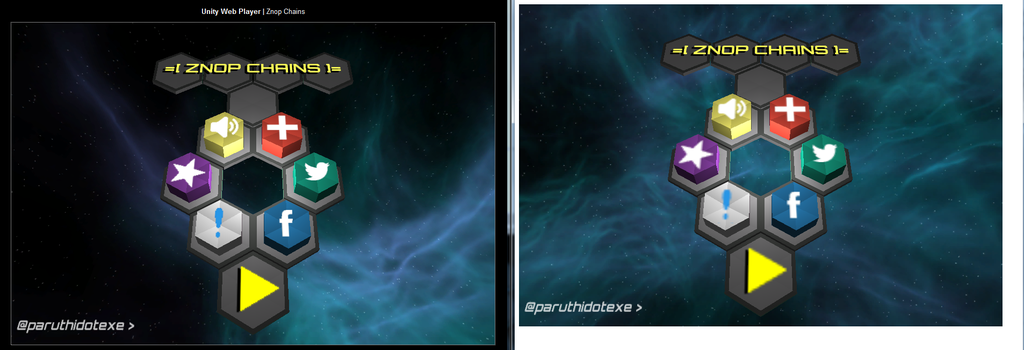
Image ref
Left side Web build vs Webgl build at rightside


Supports : Desktop versions of Firefox and Chrome
Not supported:(from unity site)
  •     Runtime generation of Substance textures
  •     MovieTextures
  •     Networking other then WWW class
  •     Support for WebCam and Microphone access
  •     Most of the non-basic audio features (anything beyond basic positional playback of audio is not supported).
  •     Script debugging
  •     Threads    Any .NET features requiring dynamic code generation (just as on other AOT platforms like iOS)
  •     Runtime GI
Tip : work with "Slow(fast builds)"  and release with "Fastest(very slow builds)"


Upcoming more on webgl and unity5 topics like how to publish a unity webgl game online, how to run unity5 build on chrome...

Screenshot Saturday 20150405

As i am working through had planned to release the WIP screenshots on Saturdays along with the fb groups.
This is the racing game i am working on now over 2 months..
Expected release date May or June 2015.

mobileRacing photo RelaxingRide_zpsnt2tn21d.png


=[ Znop Chains ]= My next game

This is my next game =[ Znop Chains ]= a brain challenge game. This is a nice and simple game. Worked fully from design, art, coding to marketing.

Znop Chain is a casual fun filled game, where the player need to create the complex chains of hexagon. It gives real challenge to your brain.
How to play ?
When a sequence is played, you watch and observe carefully
When your turn comes recreate the znop chains in the same order.
One of the most common problem now a days is memory power after coming to smart phone era. Everyone starts to refer to phone and internet to get data which they already know. This game helps you to increase brain power and remember complex things and get them from your brain.

Tools Used :
Unity 4.6.2 free version
Blender 2.7.3
Paint.net

Release Date: April 2015

Step 8: Developing Game Screen

Thanks for the feedbacks, now lets go back to next step. We will create the game scene.
A game screen has the following
  • One Director
  • One Scene
    • GameScene
  • And two layers
    • GameLayer
    • HUDLayer
Steps:
0. We had already created the Director.
1.Create GameLayer and add components to it.
2.Create HUDLayer  and add components to it.
3.Finally add these both layers to the GameScene.
4.All the code goes in to GameScene.h and GameScene.cpp
You can download code from this link

Output of the GameScreen

First lets create a HUD layer:
It has a score, timer and quit button.
This will be shown on top of the game layer.
Following is the code for HUDLayer
Declaration
class HUDLayer : public cocos2d::CCLayer
{
public:
virtual bool init();
void DrawHUD();
void OnMenu(CCObject* pSender);
LAYER_CREATE_FUNC(HUDLayer);
};

Definition
bool HUDLayer::init()
{
bool bRet = false;
do
{
CC_BREAK_IF(! CCLayer::init());
this->setTouchEnabled(true);

CCLabelTTF* scoreLabel = CCLabelTTF::create("Score 12345", "Arial", 24);
CC_BREAK_IF(! scoreLabel);
CCLabelTTF* timeLabel = CCLabelTTF::create("Time 00:00", "Arial", 24);
CC_BREAK_IF(! timeLabel);

CCSize winSize = CCDirector::sharedDirector()->getWinSize();
scoreLabel->setPosition(ccp(scoreLabel->getContentSize().width/2,
winSize.height - scoreLabel->getContentSize().height/2));
timeLabel->setPosition(ccp(winSize.width-scoreLabel->getContentSize().width/2,
winSize.height - scoreLabel->getContentSize().height/2));

CCMenuItemImage* closebtn = CCMenuItemImage::create("CloseNormal.png", "CloseSelected.png", this, menu_selector(HUDLayer::OnMenu));
CCSize closebtnSize = closebtn->getContentSize();

CCMenu* closebtnMenu = CCMenu::create(closebtn, NULL);
closebtnMenu->setPosition( ccp(winSize.width/2-closebtnSize.width/2, winSize.height - closebtnSize.height/2));

// add this to the layer
this->addChild(scoreLabel, 1);
this->addChild(timeLabel, 1);
this->addChild(closebtnMenu, 2);

bRet = true;
} while (0);

return bRet;
}

void HUDLayer::OnMenu(CCObject* pSender)
{
CCScene* nextScene = MainMenu::scene();
CCDirector::sharedDirector()->replaceScene(nextScene);
}

Now create the game layer
Add a BG for now we can go in to gamelayer in later stage
Declaration
class GameLayer : public cocos2d::CCLayer
{
public:
// Here's a difference. Method 'init' in cocos2d-x returns bool, instead of returning 'id' in cocos2d-iphone
virtual bool init();

// there's no 'id' in cpp, so we recommand to return the exactly class pointer
static cocos2d::CCScene* scene();

// implement the "static node()" method manually
LAYER_CREATE_FUNC(GameLayer);
};
Definition 

bool GameLayer::init()
{
bool bRet = false;
do
{
CC_BREAK_IF(! CCLayer::init());

// Enable touch/click actions
this->setTouchEnabled(true);

CCSize winSize = CCDirector::sharedDirector()->getWinSize();
CCSprite *player = CCSprite::create("BG02.jpg", CCRectMake(0, 0, 800, 600) );
player->setPosition( ccp(winSize.width/2, winSize.height/2) );
this->addChild(player, 1);
bRet = true;
} while (0);

return bRet;
}

Finally we have to add the two layers to the game scene by
Game Layer is added to scene @ layering position 1,
HUD Layer is added to scene @ layering position 5,
So that HUD is drawn over Game. I am leaving 2,3,4 layers position as that will be used by other layers for the game. Like particles or some other gameplay like maps etc...

CCScene* GameLayer::scene()
{
CCScene* scene = NULL;
do
{
// 'scene' is an autorelease object
scene = CCScene::create();
CC_BREAK_IF(! scene);

// 'layer' is an autorelease object
GameLayer *layer1 = GameLayer::create();
CC_BREAK_IF(! layer1);
HUDLayer *layer2 = HUDLayer::create();
CC_BREAK_IF(! layer2);

// add the layers as a child to scene
scene->addChild(layer1, 1);
scene->addChild(layer2, 5);
} while (0);

// return the Main menu scene
return scene;
}


GO TO INDEX